Encrypted Immich Backups with Restic + Rclone
How I built encrypted off-site backups for my self-hosted Immich library with Restic, Rclone, and Google Drive, then proved the setup with a full restore on a fresh server.


When I moved my photo library to Immich, I also took responsibility for keeping it safe. If the server failed or I made a mistake, I needed a way to get the library back without relying on the original machine.
I wanted an off-site copy, but I did not want to upload readable photos and videos to cloud storage. I also wanted some history, so an accidental deletion would not immediately become permanent everywhere.
I ended up using Restic for encrypted backups and Rclone for the connection to Google Drive. Getting the first backup to complete was useful. Rebuilding Immich on a fresh server gave me confidence in the setup.
Why a synchronized copy was not enough
Rclone could copy my library to another location, giving me another physical copy. But a mirror alone would not provide the recovery history I wanted. A synchronization job can carry a local deletion into the remote copy.
I wanted to be able to return to an earlier state. I also wanted the cloud provider to hold encrypted backup data rather than a browsable photo collection.
Giving each tool one job
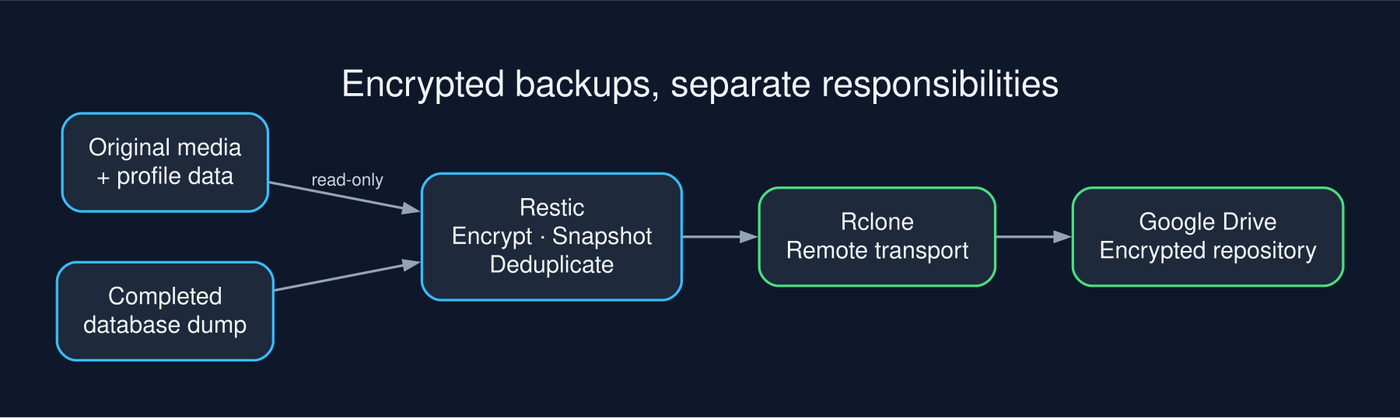
Restic handles encryption, snapshots, deduplication, and restoration. Rclone connects it to the storage provider, and Google Drive holds the resulting encrypted repository.
The flow is straightforward: Immich media and a completed database dump go into Restic, which uses Rclone to reach remote storage. Each component has a clear role, and the backup approach does not depend on Google Drive specifically.
Backing up the parts that matter
My backup container reads the Immich data directory through a read-only mount. It needs access to the source files, but it does not need permission to change them.
The mount looks like this in a Compose configuration excerpt:
# Excerpt only: add to an existing, configured backup service.
volumes:
  - ${UPLOAD_LOCATION}:/data:ro
The important distinction is between original data and generated data. I included the original media, profile data, and completed PostgreSQL dumps. I excluded thumbnails and encoded videos because Immich can regenerate them from the originals.
Excluding generated files reduces what I need to store, but it also adds work after a restore. The recovered server needs to rebuild those files before the library looks and behaves as it did before.
The database is part of the library
The media files and database need to be protected together. The database preserves the relationships and application state that make those files an Immich library.
Having both in a backup is necessary, but they also need to represent a consistent state. Uploads, deletions, or moves during the backup can leave the database referring to files that were not captured.
A scheduled Restic job does not coordinate that by itself. The backup process needs to account for application activity and ensure that a completed database dump is available before the filesystem backup begins.
Creating the encrypted repository
Once Rclone could access the remote storage, I initialized the Restic repository:
# Replace cloud and backup-repository with your chosen values.
# Run where restic and rclone are installed and the remote is configured.
restic -r rclone:cloud:backup-repository init
The repository password became part of the recovery plan. I need to be able to recover it even if the original server is gone. Access to the cloud account alone does not give me access to the encrypted backup contents.
The following command shows the filesystem backup and exclusions. It assumes the database dump has completed and the backup ordering has been handled:
# /data is the mounted Immich data directory.
# Complete the database dump and coordinate backup ordering first.
restic -r rclone:cloud:backup-repository backup /data \
  --exclude /data/thumbs \
  --exclude /data/encoded-video \
  --exclude '/data/backups/*.tmp'
Will every backup upload the whole library?
That was one of my first questions. If the library already occupies a large amount of space, I do not want every backup to upload another complete copy.
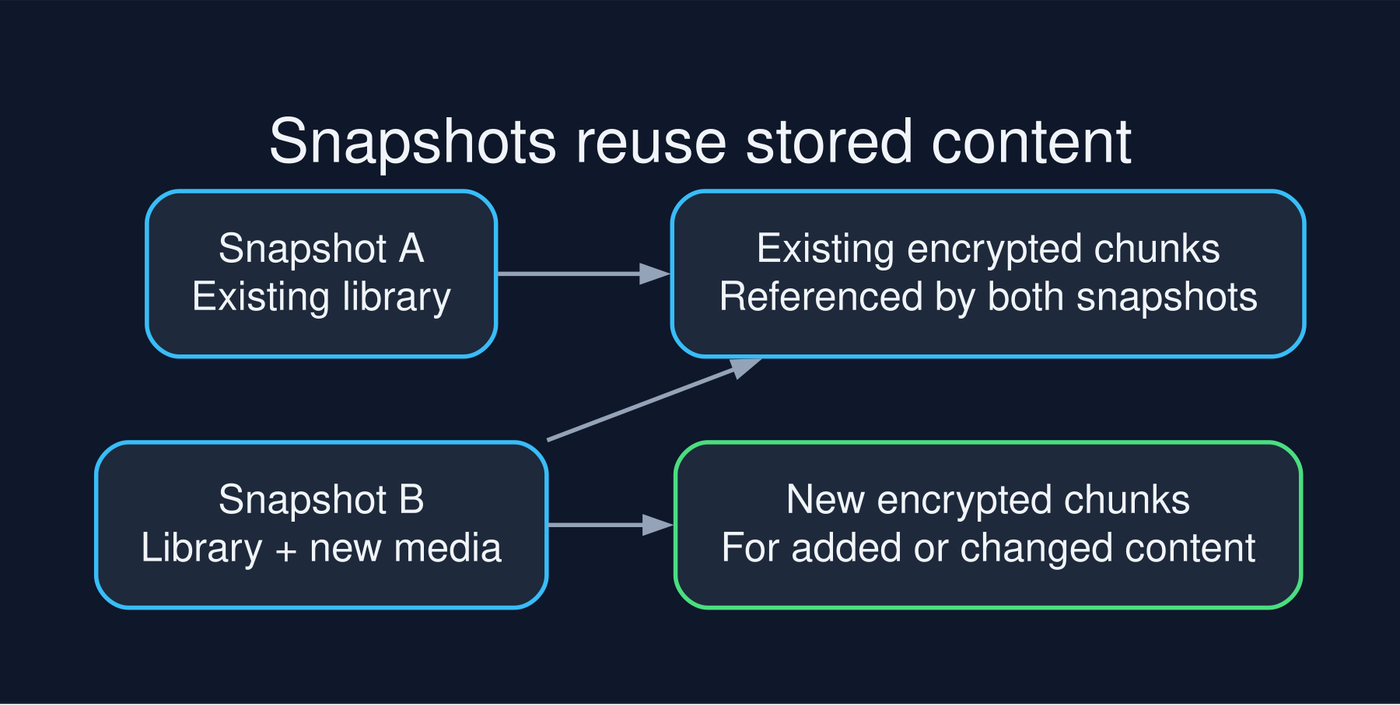
Restic splits file content into chunks and reuses content already present in the repository. Later snapshots reference existing chunks and add new ones when needed.
There is still scanning and metadata work, but each snapshot does not require a separate full copy of the library. A snapshot can represent a large amount of data while adding much less to the repository.
What happens when I delete a photo?
A later snapshot reflects the files that exist when that backup runs. An earlier snapshot can still reference a file I have since deleted, giving me a window in which to recover it.
That window depends on retention. Removing old snapshots and reclaiming the data they no longer reference are separate operations in Restic: forget removes snapshot references, while prune removes unused repository data.
The retention policy needs to reflect how far back I might need to recover. Keeping history is useful only if it lasts long enough for me to notice a mistake.
Testing recovery somewhere new
Successful backup logs told me that the job ran. They did not tell me whether I could rebuild Immich after losing the server.
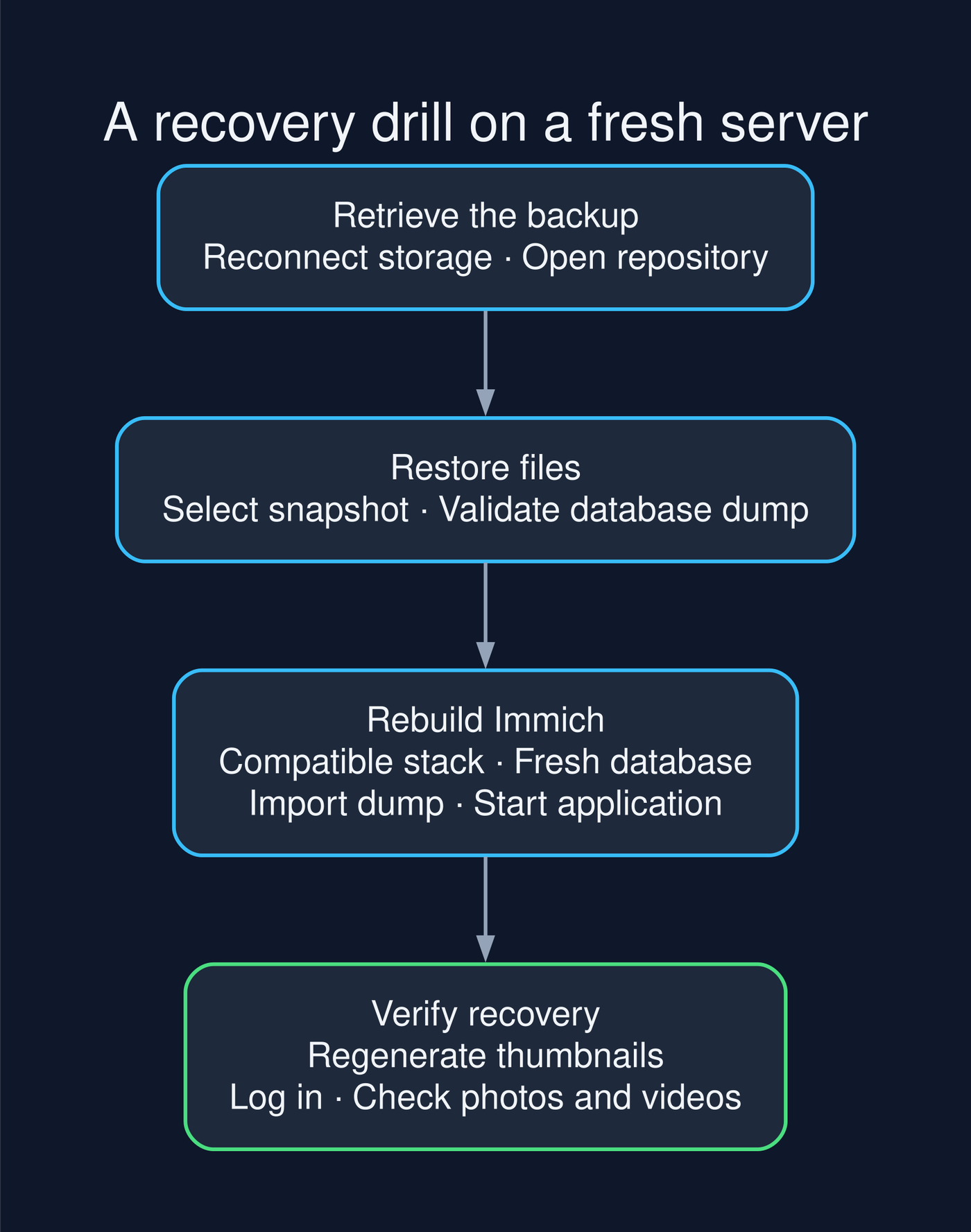
To find out, I created a temporary cloud VM with no local copy of my Immich environment. I reconnected to the remote storage and opened the encrypted repository.
I listed the available snapshots, selected one, and restored it into an empty directory:
# List snapshots in the example repository.
restic -r rclone:cloud:backup-repository snapshots

# Replace SNAPSHOT_ID with the snapshot you selected.
# Restore into an empty directory used for the recovery drill.
restic -r rclone:cloud:backup-repository restore SNAPSHOT_ID \
  --target /path/to/empty-restore-directory
The restored files included the original media and a compressed PostgreSQL dump. Before importing the dump, I checked that the compressed file could be read:
# Replace this example path with the restored database dump.
gzip -t /path/to/restored/database-dump.sql.gz
The check passed. That ruled out gzip corruption detected by that check, but it did not prove that the SQL was complete or that every referenced media file was present. Importing the database and checking the application were still necessary.
Rebuilding Immich
I used the same Immich version as the original server and a fresh database directory. For that environment, I started PostgreSQL and Redis, imported the database dump, and then brought up Immich.
The order mattered: I needed the restored application state in place before checking the library. The media files alone were only part of the recovery.
I also treated the restore procedure as version-specific. The commands and configuration used to rebuild the application need to match the version involved in the backup.
The drill took me from an encrypted repository on remote storage to a running Immich instance:
Seeing the library again
Once the database was restored and the services were running, I logged into Immich. The library was there. Because thumbnails were excluded from the backup, I regenerated them and checked that the restored media was accessible.
After completing those checks, I deleted the temporary VM. It had served its purpose: testing recovery away from the original machine.
What the drill proved
The test showed that I could retrieve the encrypted repository, restore the media and database dump, rebuild Immich, and access the library on another server.
That result applies to the backup and recovery path I tested. Future snapshots still need attention, and another failure could introduce different problems. But I now had evidence that this backup contained what I needed for the recovery I performed.
A successful job notification tells me that the backup process completed. A recovery drill tells me whether I can use its output to get the application back.
What belongs in the recovery plan
The media and database are only part of what I need. I also need access to the repository password, the remote storage credentials, and the configuration required to recreate the application.
Those details need to survive losing the original machine. I also need to know which generated files were excluded and which jobs to run after restoration.
A short recovery note can capture the essentials:
- How to access the remote repository.
- Where to recover the password and credentials.
- How to select and restore a snapshot.
- Which application version and configuration to use.
- How to restore the database.
- What to regenerate and how to check the result.
The setup I kept
Restic and Rclone gave me encrypted off-site snapshots without tying Immich to a particular cloud provider. The read-only source mount limits what the backup container can change, and excluding generated files keeps the repository focused on data I cannot recreate.
The recovery drill gave me a practical reason to trust the setup. I had seen my library running on a fresh machine and knew the steps required to get there.
That is the question I now want a backup to answer: if the original server disappears, can I get the application and its data back?